
VLC Streamer
Hobbyist Software LtdVideo Players & Editors
4.077.00 Reviews
- Version
- 2.57 (3904)
- Installs
- 10.00K
- Age Rating
- Everyone
Screenshots
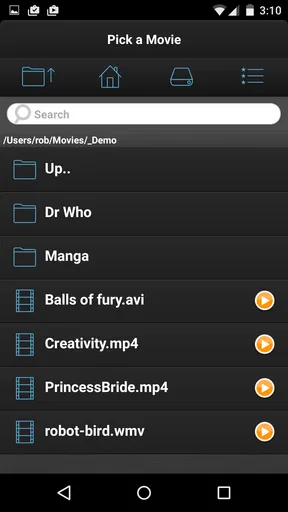
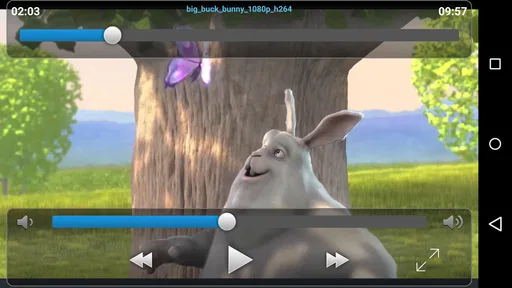

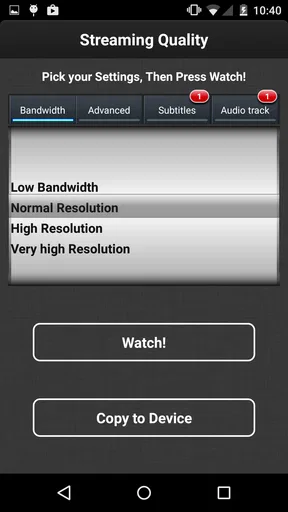
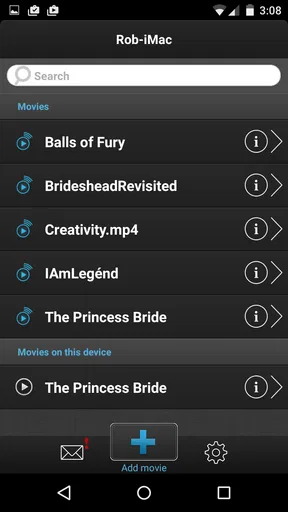
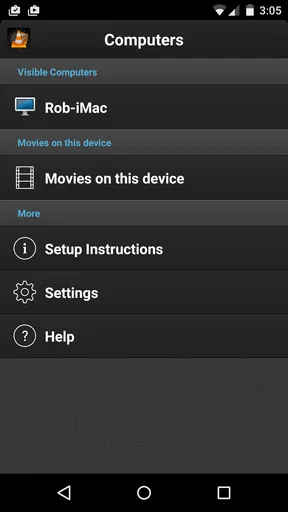
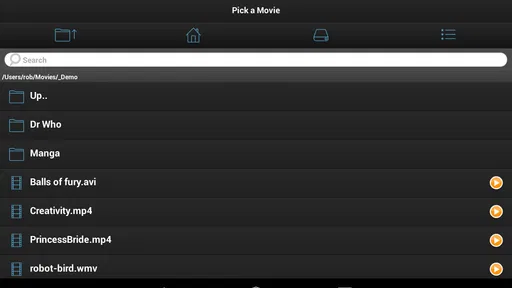
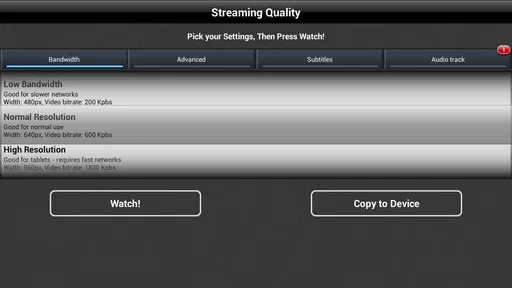
Our Review of VLC Streamer
 Analysis by Appyee
I like the idea behind VLC Streamer because it solves a very specific problem: watching a movie stored on a computer from an Android device without moving the file first. In my experience, that makes more sense than maintaining a second copy of a large video on a phone or tablet. The app belongs to the video players and editors category, costs $2.99, and is made by Hobbyist Software Ltd.
The important thing is to approach it as a companion for a computer-based media library, not as a replacement for every modern streaming service. Its store summary describes the central use clearly: you can sit somewhere in your house and watch movies on Android. That simple purpose is also its main strength. When your needs match it, the workflow is pleasantly direct. When you expect cloud streaming, phone-to-phone sharing, or a broad entertainment catalog, the fit is much less convincing.
What using VLC Streamer feels like at home
The most natural setup is a computer holding your video files and an Android device connected to the same home network. Instead of copying a film to the device, I would use the mobile screen as the viewing point while the computer remains the place where the file lives. This is useful in ordinary situations: the television is occupied, you want to watch in bed, or you would rather use a tablet in the kitchen while someone else uses the main screen.
That arrangement changes the way I think about storage. A long movie can take a meaningful amount of space on a phone, especially when several family members keep different files available offline. Streaming from the computer avoids that duplicate library. The trade-off is that the computer needs to be available and the home connection needs to behave well enough for continuous playback.
I would not describe this as a one-tap service for people who want instant entertainment. There is a little more responsibility on the user because the content comes from their own computer. You need to know where the files are, keep the host machine accessible, and understand that playback depends on the relationship between the computer, the network, and the Android device. That is not a flaw in itself, but it is a different experience from opening a subscription app and choosing a title.
The app is rated for Everyone, which makes its intended audience broad. Still, the practical audience is narrower: people who already keep videos on a computer and are comfortable with a home-network workflow. A technically confident user may appreciate that control. Someone who wants no setup at all may find the same control feels like extra work.
The developer and the app’s modest footprint
Hobbyist Software Ltd is the developer behind the app. VLC Streamer has reached over ten thousand installs and has an average rating of 4.0 from over five hundred ratings, with dozens of written reviews. Those figures suggest an established but focused utility rather than a mass-market entertainment platform. I read that as a reason to judge it by how well it handles its particular job, not by whether it competes with the biggest video services.
The app was released on March 4, 2013, and the current version is 2.57 (3904). Its minimum Android requirement is version 7.0. That combination tells me to check compatibility before paying, especially if the app is intended for an older spare phone or tablet. A device running an earlier Android release will not meet the stated requirement, while a compatible device still needs enough practical battery life and a stable connection for extended viewing.
The age of the project is neither automatically good nor bad. A long-running utility can be reassuring when its purpose has stayed clear, but older applications can also feel less aligned with newer Android habits. I would therefore install it for the specific computer-to-device workflow rather than expecting the interface or account model of a newly designed media platform.
Why the computer remains central
The biggest conceptual detail is that this is not simply a local player. The computer is part of the viewing chain. That means the best experience comes from treating the setup like a small personal media system: keep the host computer in a predictable place, organize the video folders sensibly, and avoid putting it to sleep just as you begin watching.
A useful everyday example is a shared household. I might leave the family television free while watching a downloaded film on an Android tablet from the sofa. Another person can use the main screen, while the movie stays on the computer instead of being copied to the tablet. This is more convenient than it sounds when the file is large or when I expect to watch only part of it.
There is also a practical travel boundary. Because the app is designed around watching from a computer in the house, I would not choose it as my main solution for flights, commuting, or places without access to that home setup. A local download or a service with offline viewing is better for those situations. VLC Streamer is strongest when “streaming” means moving video around your own home, not carrying the whole viewing system with you.
Privacy and trust: what I would check before using it
For a media utility, trust is less about flashy features and more about knowing what I am connecting. The key relationship here is between the Android device and the computer that supplies the video. Before using it, I would make sure I understand which computer is selected, which folders are exposed to the workflow, and whether the device is connected to the intended home network.
I would also avoid treating an unfamiliar shared network as equivalent to my private home network. A personal media setup is easier to reason about when the router and connected devices are under my control. On a guest network, public Wi-Fi, or a network shared with many people, I would be more cautious about starting a computer-based streaming session. That is not a claim about hidden behavior; it is simply good practice whenever one device reaches toward another across a network.
The app’s price is another part of the trust decision. At $2.99, the purchase model is straightforward compared with a recurring entertainment subscription, but a paid download still deserves a compatibility check first. I would confirm that the Android device meets the minimum requirement and that the intended computer-based use matches my expectations before spending the money. A low one-time price does not make an unsuitable workflow suitable.
I also prefer to keep user choices visible and deliberate. If Android presents prompts during setup, I would read them rather than approving everything automatically. I would pay attention to the device or network connection being requested and stop if the screen does not match what I expect. Since the app’s purpose involves communicating with a computer, I would not interpret a connection prompt as something to dismiss blindly.
Data-sensitive moments in real use
The most sensitive moment is the first connection, not the middle of a film. That is when I would verify that I am pairing with my own computer and not another machine with a similar name. I would also avoid using a media computer that contains private material in a casually shared environment. Keeping the media library organized is useful for playback, but it also helps me know exactly what I am making available to my own viewing setup.
Another sensitive moment comes when troubleshooting. If playback fails, the tempting reaction is to change several network settings at once or connect through a different network without considering who controls it. I get better results by changing one thing at a time: check that the computer is awake, confirm both devices are on the intended network, then retry. This is slower than guessing, but it preserves a clearer picture of what is happening.
I would be especially careful with a laptop used for work or shared with other people. The convenience of watching a film from that machine should not outweigh the need to keep personal or professional files separated from the media workflow. VLC Streamer is more comfortable when the host computer has a tidy, dedicated media location rather than being a disorganized catch-all for sensitive documents.
For parents or households with several devices, the Everyone content rating describes the app’s general suitability, not the content of the videos being streamed through it. I would still manage the movie library separately and choose age-appropriate files. The app provides the viewing route; it does not turn every file on the computer into universally suitable content.
Controls and everyday troubleshooting
My first practical tip would be to prepare the host computer before opening the Android app. Put the intended movie in a known folder, keep the computer awake for the expected viewing period, and make sure the Android device has a comfortable battery level. These small steps prevent the most annoying kind of failure: a session that works initially but stops because the host disappears.
My second tip is to test with a short, nonessential video before settling in for a full film. That lets me check the connection and confirm that the selected computer is the correct one. It also separates setup problems from file-specific problems. If a short test works but one particular movie does not, I have a more useful starting point than repeatedly restarting everything.
A third tip is to use a consistent naming and folder system. This sounds mundane, but it matters when the computer contains many videos. A clear library reduces the chance of starting the wrong file and makes the app more useful for household members who did not organize the collection themselves. The benefit is not a hidden feature; it is a workflow improvement that makes a simple streaming tool feel much less frustrating.
Network quality is another trade-off. A strong connection can make the experience feel close to local playback, while congestion or distance from the router can turn a relaxed movie into a sequence of interruptions. I would test the exact room where I plan to watch, not just assume that the network works well everywhere in the house. A device that plays perfectly beside the router may behave differently at the edge of coverage.
I would also keep the screen and power settings in mind. Long viewing sessions are harder on a phone than on a television, and a device that dims or locks unexpectedly can interrupt the experience. The right settings depend on the Android device, but the general lesson is simple: prepare it as a viewing screen rather than treating the session like a quick clip.
Where it beats common alternatives
Compared with copying files manually, VLC Streamer saves the duplicate storage and the waiting time involved in transferring a large video. It is particularly appealing when I want to watch something once or twice but do not want to maintain an offline copy. Manual transfer remains better when I need reliable playback away from home, because the file travels with the device and does not depend on the computer staying reachable.
Compared with subscription streaming services, the app gives me control over my own collection instead of limiting me to a changing catalog. That matters for personal recordings, legally acquired files, or older movies that are difficult to find on mainstream services. The obvious cost is convenience: a subscription app handles discovery, hosting, and usually account-based playback, while this tool assumes I already have the video and the computer.
Compared with a modern media-server platform, VLC Streamer may appeal to someone who wants a narrower purpose and does not want to build a larger library-management system. A full media server can be the better choice for multiple televisions, several users, artwork, profiles, and more elaborate organization. I would not pick VLC Streamer for a household seeking a complete living-room platform. I would pick it when the main request is simply, “Can I watch my computer’s movies on this Android device?”
Compared with ordinary mobile video players, the distinction is equally important. A local player is simpler once the file is on the device, and it avoids network dependence during playback. VLC Streamer’s advantage appears before playback: it can leave the file on the computer. That makes it a useful bridge between a personal computer library and an Android screen, not necessarily the best standalone player for every file or situation.
Who should choose it, and who should skip it
I would recommend it to someone with a stable home network, a computer containing videos, and an Android phone or tablet that is comfortable for viewing. It is also a reasonable choice for people who dislike recurring subscriptions and prefer a small, focused purchase. The one-time $2.99 cost is easy to understand, provided the computer-centered workflow is genuinely useful.
I would skip it if my main goal were watching while traveling, streaming from outside the home, or accessing a catalog I do not already own. I would also hesitate if I rarely use a computer for media or if the intended Android device cannot run Android 7.0. In those cases, a local-download approach or a service designed around offline access would be less dependent on a home machine.
Another reason to skip it is a low tolerance for setup. The app’s value depends on several pieces working together, so it cannot remove every point of friction. If I want a television-style interface with minimal configuration, a dedicated media platform may be more satisfying. If I enjoy keeping my own files and want a direct route to an Android screen, the narrower design becomes an advantage rather than a limitation.
My cautious verdict
VLC Streamer is a practical home-streaming tool when its boundaries are understood. I like that it focuses on a real everyday need: watching computer-based movies on Android without filling the device with duplicate files. The app’s privacy and trust story is best handled through careful choices by the user—connect only to the intended computer and network, keep the media location organized, and read Android prompts instead of accepting them automatically.
Its limitations are equally clear. It depends on the host computer, the home network, and a compatible Android device. It is not the right answer for offline travel, subscription-style discovery, or a full multi-user media center. Those are not failures so much as boundaries that should be visible before purchase.
With the current version at 2.57 (3904), the app remains a focused option for the person who wants a simple link between a personal computer and an Android screen. I would recommend it to a friend who described exactly that situation, especially if avoiding file transfers matters more than having a polished catalog. I would not recommend buying it merely because it is inexpensive. Choose it for the workflow, not for the label of being a video app.
Verdict
Strengths of VLC Streamer
- Streams videos from your computer to mobile devices without copying files.
- Supports many popular video formats and codecs.
- Offers subtitle support for a more flexible viewing experience.
- Playback can continue over a local Wi-Fi network with minimal setup.
- Includes useful controls for pausing, seeking, and adjusting playback.
Limitations of VLC Streamer
- Requires a computer running the VLC Streamer helper application.
- Streaming quality depends heavily on Wi-Fi strength and network congestion.
- Remote streaming outside your home network is not its main focus.
- Initial computer pairing may feel confusing for less experienced users.
- Some advanced VLC desktop features are unavailable in the mobile app.
Other Releases by Hobbyist Software Ltd
View All
VLC Remote
Video Players & Editors4.5
Similar Picks in This Category
View All
Google TV
Google LLC3.9

iTunes
Apple4.7

YouTube
Google LLC3.8

MX Player
Amazon Mobile LLC4.2

CapCut - Video Editor
Bytedance Pte. Ltd.3.5

PLAYit-All in One Video Player
PLAYIT TECHNOLOGY PTE. LTD.4.5
Frequently Asked Questions
What is VLC Streamer and what can I use it for?
VLC Streamer lets you watch videos stored on your computer from a compatible Android or iOS device over a local Wi-Fi network. It works alongside a desktop helper application, which prepares and streams the selected video to your phone or tablet. This makes it useful for watching personal video files without transferring the entire file to your mobile device first.
Do I need a computer and a Wi-Fi connection to use VLC Streamer?
Yes. VLC Streamer is designed to stream content from a computer, so you normally need to install its helper software on the desktop and keep the computer switched on while watching. Your mobile device and computer should be connected to the same local Wi-Fi network. Streaming quality can vary considerably when the signal is weak, the network is busy, or the computer has limited processing power.
Which video formats and files are supported by VLC Streamer?
VLC Streamer is intended to handle many common video formats, but support may depend on the desktop helper, the operating system, and the conversion settings being used. Some files may need to be transcoded before playback, which can take time and use computer resources. Videos protected by DRM, stored in unsupported locations, or using unusual codecs may not work correctly.
Can I download videos for offline viewing with VLC Streamer?
The main purpose of VLC Streamer is network streaming rather than permanent offline playback. Depending on the version and platform, it may offer options to prepare or transfer content, but users should not assume that every streamed video can be saved for later viewing. If offline access is essential, check the current app listing and test the feature with your own files before relying on it.
Is VLC Streamer free, and are there any limitations to consider?
Availability, pricing, and included features can differ between Android and iOS versions, as well as between the mobile app and desktop helper software. Before downloading, check the official store listing for the current price, advertisements, in-app purchases, and compatibility requirements. Also remember that VLC Streamer is primarily intended for personal media on your own computer, not for accessing commercial streaming services.
